The preacher says "Romans 8:28". In the booth, someone opens the book, scrolls to the chapter, finds the line, sends it to the screen — and the text lands just as the reading ends. That gap of a few seconds repeats at every quotation, and after a while the congregation stops looking at the screen at all.
Why project Bible verses automatically during the sermon?
The problem is not the volunteer's skill. It is the chain of actions we ask them to run live, with no safety net.
They have to hear the reference correctly, in a room where the monitor mix is rarely perfect. They have to recognise it: "Romans eight twenty-eight" is not spoken the same way by every preacher, and some read the text before announcing the address. Then they have to type it without mistyping a digit, check they are on the version the church actually reads from, and push it out. Four or five actions, while the message keeps moving.
Then come the awkward cases. The preacher jumps back two verses to land on a single word. He strings two passages together in one sentence. He announces a chapter, reads three lines from it, and walks into another book without warning. A volunteer new to the booth gives up after ten minutes and leaves the screen on the last verse — sometimes until the end of the message.
The outcome is always the same: the screen becomes decoration. The people who did not bring a Bible, the ones hearing the passage for the first time, the ones who follow poorly by ear, have nothing left to hold on to.
How automatic projection actually works
Voice transcription listens to the sermon and detects Bible references spoken aloud. When a reference is recognised, the matching verse is projected with no operator action. That is the whole idea: the booth no longer chases the preacher, it keeps pace with him.
Setting it up comes down to three decisions, all taken before the service.
- Choose which versions appear on screen. The catalogue offers 93 downloadable Bible versions across 51 languages, 14 of them enabled by default. A church that always reads from one translation keeps one. A bilingual congregation shows two side by side on the same slide. Picking and arranging them is covered in the Bible projection documentation.
- Point the software at the right microphone. The default speech engine is Soniox, with Deepgram as a fallback. The full walkthrough lives on the voice transcription page.
- Decide who stays in control. Every suggestion can be accepted or ignored, and manual projection stays available at all times. Some churches let everything through automatically; others prefer a volunteer to confirm with one click. Both work.
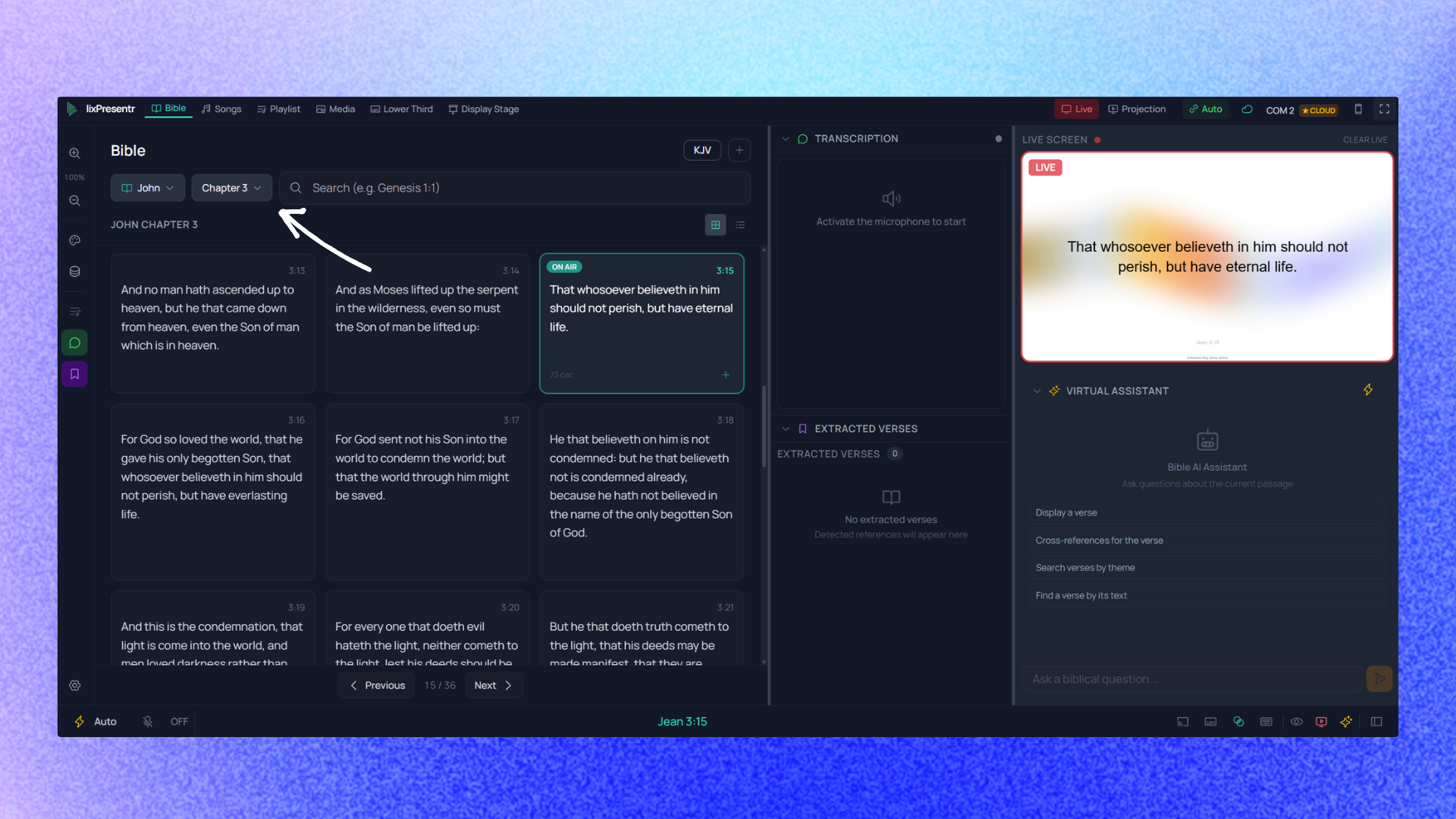
Manual navigation does not go away. It sits exactly where it was: book, chapter, verse. Full-text search runs locally and answers in under 10 milliseconds, which means an operator who remembers a fragment of a sentence but not the address finds the passage faster than by flipping pages.
What automatic projection does not do
An honest article has to name its limits, or the disappointment turns up on Sunday morning.
Speech recognition needs an internet connection. This is the real constraint. Projection, Bibles, songs and playlists all work without a connection; voice recognition does need one. A rented hall with flaky wifi, a basement with no signal, and this one feature stops — the rest of the software carries on. Worth checking before building an entire service flow on top of it. Sound quality decides everything. A well-set lapel microphone and comfortable recognition go together. An ambient microphone six metres away, in a room that echoes, while the worship team packs gear at the back, is another story. Testing beats hoping: a ten-minute rehearsal on Saturday tells you in a few sentences what Sunday will look like. Preachers stay unpredictable. An allusion with no reference — "as Paul writes to the Philippians" — is not an address. Neither is a paraphrase. Automatic detection covers announced quotations, not hints. That alone is a good reason to keep someone in the booth rather than leaving the computer on its own. It is not an excuse to stop preparing. When the outline of the message is known ahead of time, preparing the main passages is still safer. Automatic detection then acts as a net for the improvised quotations, which are usually the most numerous ones.What changes in the room
The benefit is not measured in seconds saved. It is measured by the screen becoming trustworthy again. When the text arrives during the reading instead of after it, people read it. When they read it, they remember it. And the volunteer in the booth stops spending the whole service staring at a laptop.
For a church starting out, it is also a recruiting question: finding someone to staff the booth gets much easier once the job no longer means racing the preacher.
There is a quieter effect too, and it shows up in the second half of the message. An operator who is not decoding references keeps a head free for the rest of the service — the offering slide nobody warned them about, the guest speaker who runs long, the song the worship leader adds at the last second. Removing one demanding task does not just speed up that task; it gives back the attention every other task was silently competing for.
What each plan opens up is set out on the pricing page.
Frequently asked questions
Do I need an internet connection for automatic verse projection?
Yes, for speech recognition only. Projection, Bibles, songs and playlists all work without a connection: everything is stored and rendered locally. A few side features do need one of their own — the assisted chat, syncing between machines, the store and signing in to an account. A network drop mid-service pushes the booth back to manual mode, it does not black out the screen.
Does the operator stay in control?
Yes. Every suggestion can be accepted or ignored, and manual projection stays available at all times. Nothing forces full automation: many churches start by letting transcription suggest, then switch to hands-off once they have watched how it behaves over two or three Sundays.